Introduction
When you receive a new license key file, you can update System Frontier at any time to have the new license take effect immediately.
Obtain the license key
Your license key zip file will arrive as an attachment via email from an @noxigen.com email address.
Unzip the file and open it with your preferred text editor. It will look something like this.
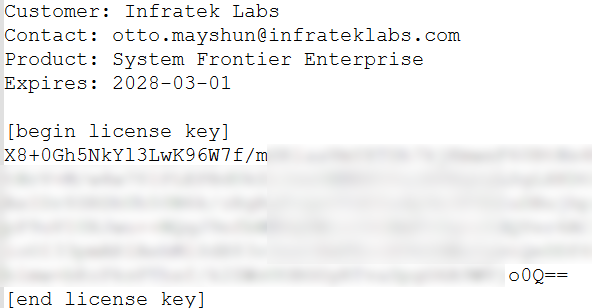
Copy the license key text between the [begin license key] and [end license key] sections.
If you are past the grace period and unable to access settings from the web interface, skip to the After the grace period section.
Activate the license key
From the System Frontier web interface, navigate to Settings > More… > License key
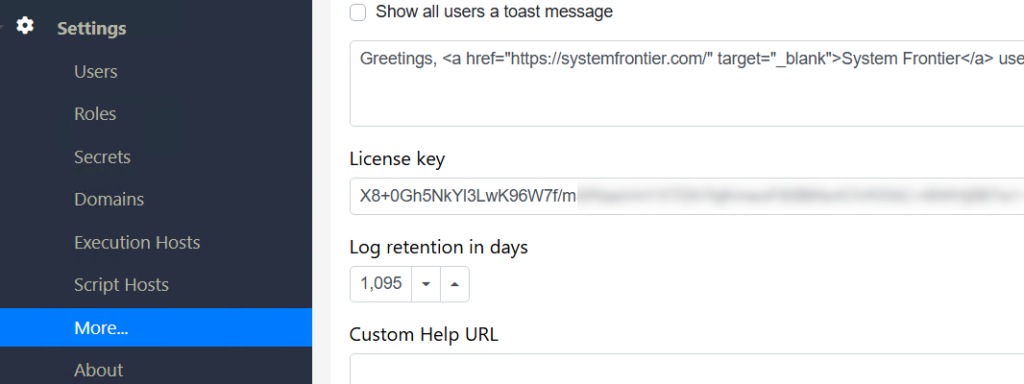
Select the existing key text and paste the new license key to replace it.
Scroll to the bottom of the page and click Save.
After the grace period
There is a 30-day grace period once a license key expires, giving you time to still activate the key using the web interface. If you’ve exceeded the grace period, update the key using direct SQL or have a database administrator perform this step.
USE [SystemFrontierV2]
GO

UPDATE [dbo].[Setting]
SET [Value] = '<New license key here>'
WHERE [Name] = 'LicenseKey'
	AND [Type] = 0
AND [Deleted] = 0IIS and verification
The application pool for System Frontier will need to be recycled on every web server for the license to take effect.
Verify that the new key has taken effect by navigating to Settings > About in the web interface.