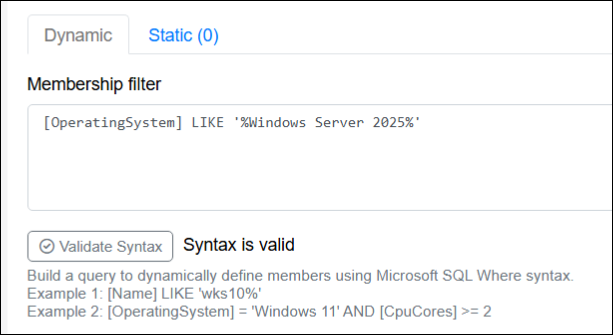
This guide will provide details on how to design membership filters to enable dynamic collection memberships.
Introduction
Membership filters in System Frontier are used to search the database for existing objects and filter them down to the desired results. Objects that match the filter become dynamic members of the collection. The syntax is based on the Transact-SQL WHERE syntax for Microsoft SQL Server. You only need to define the part of the query after the WHERE statement. The available columns are listed below.
Example membership filters
Below are some example membership filters to give you a better idea of what’s possible in terms of configuring dynamic collection memberships.
Workstation computers with a hostname that starts with “CORP” and also have more than 1 CPU core
[Type] = 2 AND [Name] LIKE 'CORP%' AND [CpuCores] > 1Server computers in the Finance Apps Active Directory OU.
[Type] = 1 AND [DistinguishedName] LIKE '%OU=Finance Apps,DC=lab,DC=noxigen,DC=net'Virtual database servers based on a server naming standard where “DBS” represents a database server. Also, only from two specific domains.
[Type] = 1 AND [Name] LIKE '%DBS%' AND [IsVirtual] = 1 AND [DomainOrWorkgroup] IN ('LAB','Dev')Network switches only in the 192.168.77.0 to 192.168.80.0 range.
[Type] = 4 AND [IPAddress] LIKE '192.168.[77-80].%'Computer properties
The following list of computer properties can be used in dynamic membership filters. All datetime fields are in UTC.
|
Column |
Data type |
Description |
|---|---|---|
|
Type |
tinyint |
The type of computer object. The type of computer object is tied to licensing so it should reflect accurate data. Possible values: |
|
Name |
nvarchar(64) |
Hostname or FQDN |
|
Description |
nvarchar(1024) |
|
|
IPAddress |
nvarchar(50) |
Primary IP address (IPv4 or IPv6) |
|
ManagementIPAddress |
nvarchar(50) |
Out-of-band management IP address (IPv4 or IPv6). For IPMI, iLO, iDRAC, etc. |
|
Manufacturer |
nvarchar(256) |
|
|
Model |
nvarchar(256) |
|
|
SerialNumber |
nvarchar(512) |
|
|
CpuName |
nvarchar(256) |
Example: Intel(R) Xeon(R) Gold 6154 CPU @ 3.00GHz |
|
CpuCount |
smallint |
Physical CPU sockets |
|
CpuCores |
smallint |
Cores per socket |
|
CpuLogical |
smallint |
Logical CPUs |
|
CpuSpeed |
smallint |
In MHz. Example: 1.2 GHz stored as 1200 |
|
TotalMemory |
int |
In MB. Example: 4 GB stored as 4096 |
|
DomainOrWorkgroup |
nvarchar(128) |
Domain or workgroup the computer is a member of. |
|
DistinguishedName |
nvarchar(256) |
Active Directory distinguished name (DN). |
|
OperatingSystem |
nvarchar(128) |
Example: Microsoft Windows Server 2025 Datacenter |
|
TimeZoneOffset |
smallint |
Example: Central Standard Time (CST) in the US is UTC-6 and stored as -360 |
|
Status |
tinyint |
A value of 0 for Unknown is the default. Custom values can be configured in settings. |
|
Environment |
tinyint |
A value of 0 for Unknown is the default. Custom values can be configured in settings. |
|
AssetId |
nvarchar(128) |
Used to store custom asset information like an asset tag or a relational identifier for an external application. |
|
IsVirtual |
bit |
Boolean referring to whether is this computer is a physical or virtual device. Possible values: |
|
LastBootupTime |
datetime |
Last timestamp of when the computer booted up. |
|
LastSeen |
datetime |
Last timestamp of when System Frontier contacted the computer using ping or remote query. |
|
CreatedDate |
datetime |
Timestamp of when the computer was added to System Frontier. |
|
ModifiedDate |
datetime |
Timestamp of when the computer was last modified in System Frontier. |
Filter validation
Once you’ve defined your filter query, click Validate Syntax to check it against the T-SQL parser and resolve any errors before saving.