Introduction
System Frontier includes many options for managing servers, workstations and other computer objects remotely. This guide is a starting point for all the various tools available.
Computer console
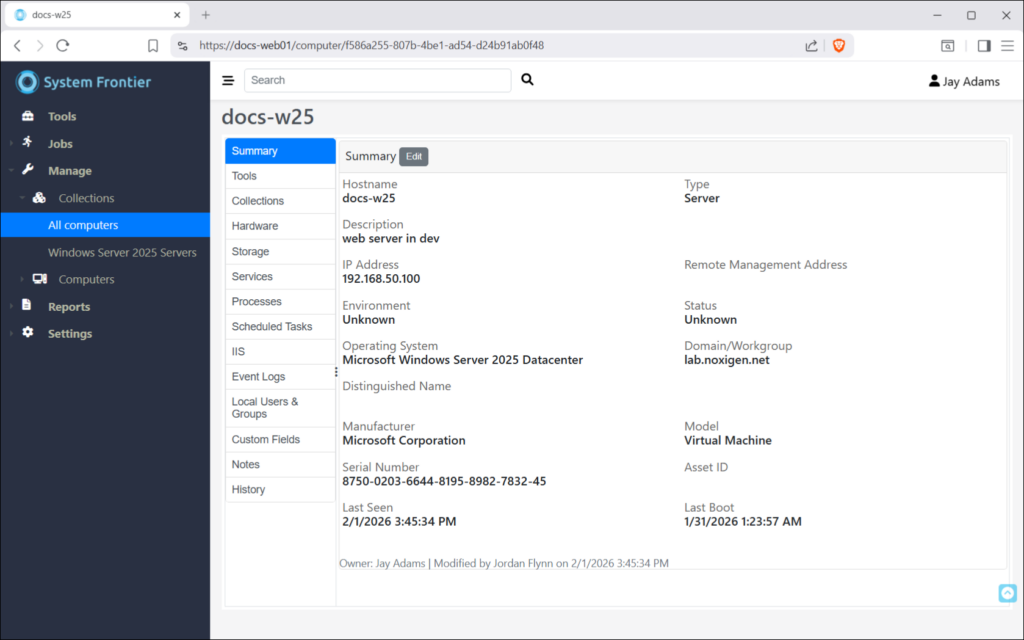
This is the primary way you manage computers interactively through the web interface. There are a series of tabs on the left that group each area of management. A user will only see tabs they’ve been give access to, based on RBAC policies.
Access to every tool is also available via the REST API and follows the same RBAC model.
Summary
The summary tab displays high level information about the computer, including hostname, type, description and several other data points.
Tools
(todo: tools info)
Collections
Here you can see the list of collections that the computer is a member of. An asterisk (*) at the end of a collection name signifies that it will be used for as the primary collection when credential resolution happens.
Hardware
Hardware information like manufacturer, model, serial number, CPU and RAM can be found here.
Storage
Local fixed disk information, including total space and free space can be found here.
Services
Windows service information, including status, startup type and log on as account information can be found here.
Permissions to start, stop or restart services can be delegated using RBAC policies.
Processes
Running processes on the remote machine can be found here, including process name, PID and user name.
The ability to kill a process can be delegated using RBAC policies.
Scheduled Tasks
Windows scheduled tasks can be found here. The ability to start, stop, enable or disable scheduled tasks can be delegated using RBAC policies.
IIS
If the remote server has the IIS remote management feature enabled, application pools and websites will be found here. The ability to start, stop and recycle application pools can be delegated using RBAC policies. The same is true for websites.
Event Logs
Windows event logs can be found here. The ability to delegate access to specific event logs, like Application or Security, can be delegated using RBAC policies. Once an event log is selected from the dropdown, those events will be loaded into view.
Local Users & Groups
The list of local users, groups and group members can be found here.
Custom Fields
Custom properties about each computer can be stored in System Frontier.
Notes
From this tab you can add notes about this computer. Notes are public by default, meaning users who have permissions to manage this computer can see them. Notes can be marked as private so only the person who created sees them in the web interface.
History
The audit trail of all actions taken on this computer can be found here. The type of message, who initiated the action and a timestamp of when it happened are all logged.